Room Redesign · what you can do · first redesign free
Declutter a room photo with AI
Seeing a room without its clutter is often what gets people to clear it, and it is hard to imagine while the boxes are still there. Kubikly has two modes for it: Declutter only, which clears the mess and leaves your furniture and finishes as they are, and Clean & redesign, which clears it and then restyles the room.
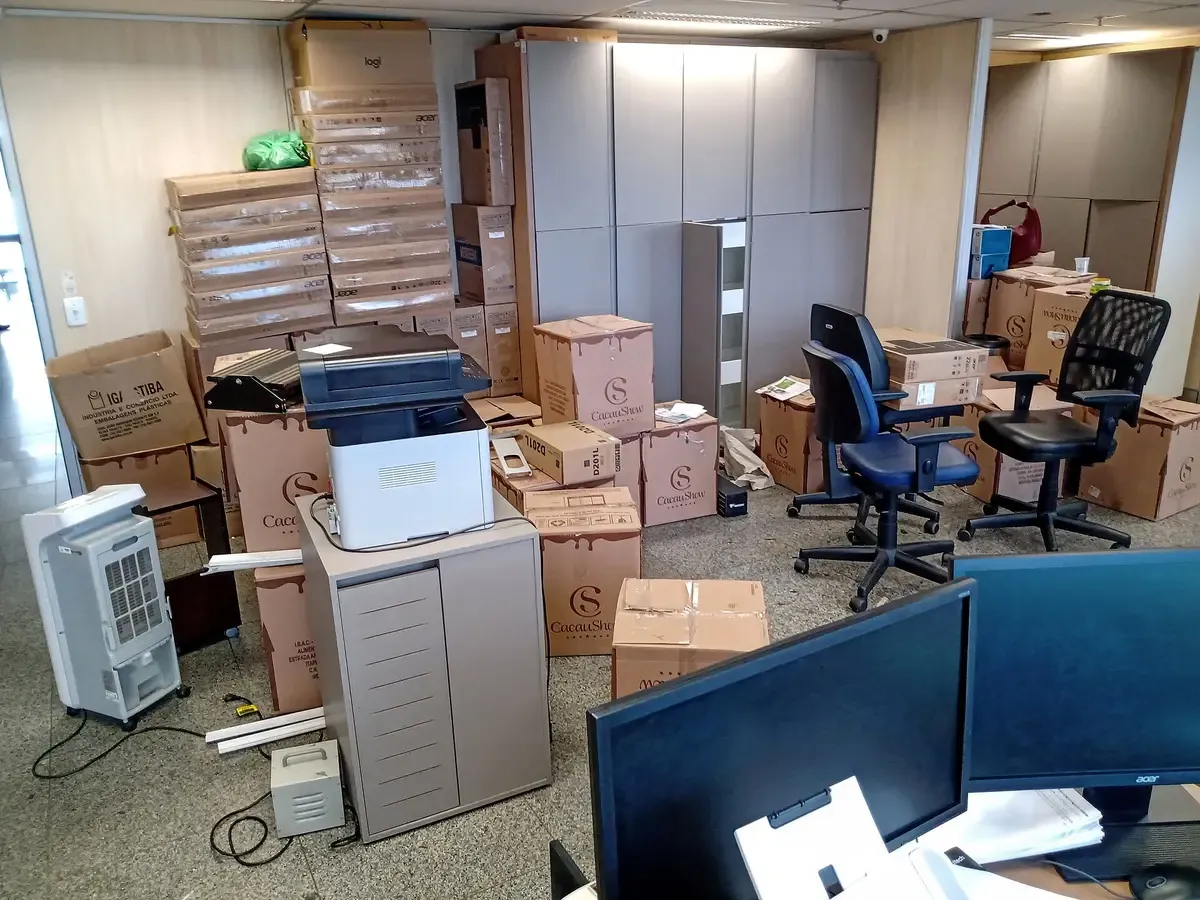
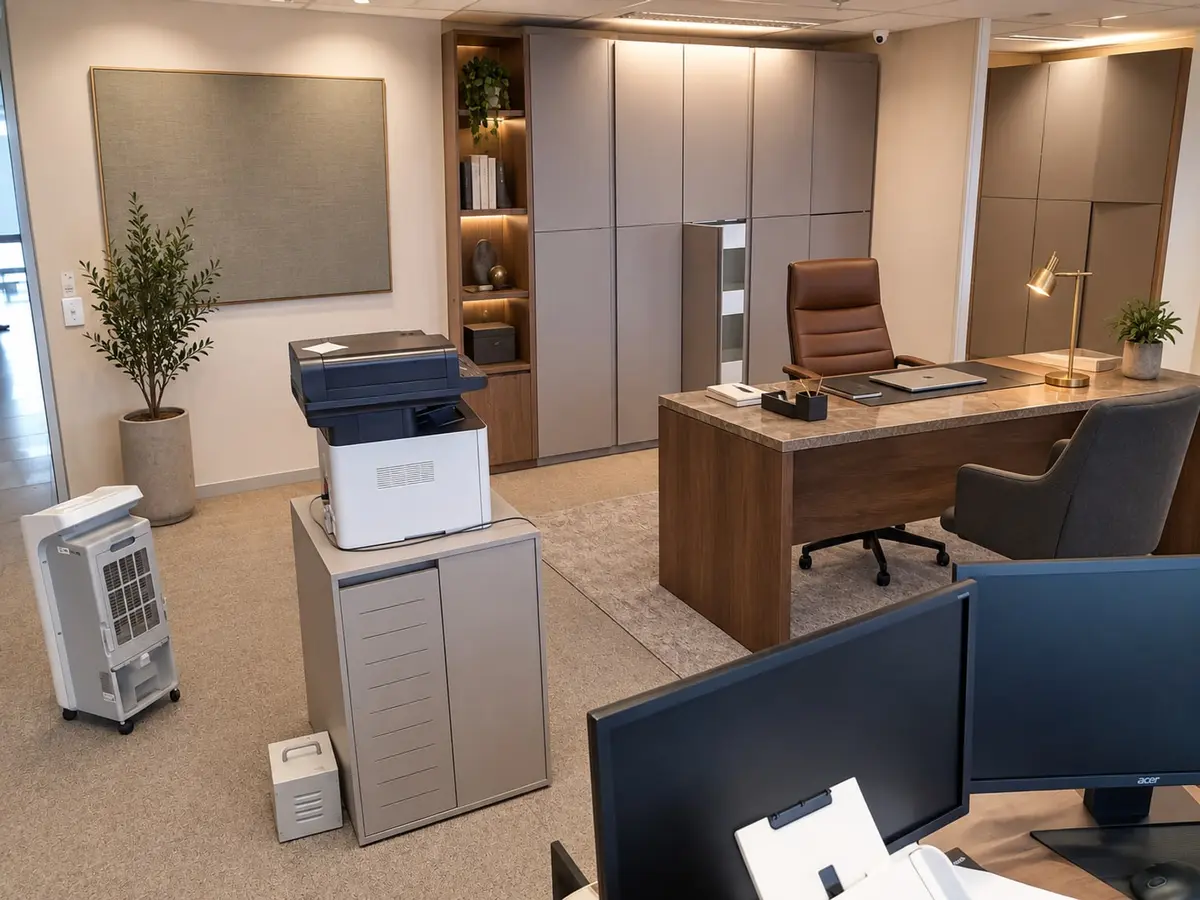
Asked: “Turn this into a calm, organised home office.” · Clean & redesign · Luxury Office
The cabinetry, the printer stand and the monitors in the foreground are kept; the boxes are cleared and a desk, chair, shelving and an acoustic panel are added.
Original photo by OboeBlanket, CC0, via Wikimedia Commons. The “after” is an unretouched Kubikly redesign (AI-generated); not a customer photo.
Things you can ask for
- “Declutter only: clear the floor and the desk, keep all the furniture”
- “Remove the boxes and the clothes on the chair, keep the books on the shelf”
- “Turn this into a calm, organised home office.”
- “Clear the worktops but keep the kettle and the fruit bowl”
- “Clear the windowsill too, and fewer things on the shelves”
Which mode to choose
- Declutter only removes the clutter; furniture, finishes, colours and layout stay. Use it to see your own room tidy, to work out what needs a home, or to get a calmer picture of a room you are not changing.
- Clean & redesign removes the clutter first, then restyles the room in the style and budget you choose. Use it when the mess is part of why the room does not work.
If nothing in the room is staying, Full transformation keeps only the architecture and replaces everything movable.
Step by step
- Upload a photo of the room as it is. Do not tidy first.
- The analysis lists what it found, with clutter (boxes, bags, clothes, loose papers) separate from furniture and decor.
- Check the list: mark anything that should stay Keep (a guitar, a plant, the books) and anything it missed Remove.
- Choose Declutter only or Clean & redesign and run it; a design usually takes about a minute.
- Compare with the before/after slider. The spec panel shows what was removed and what was kept.
Using the result in the real room
The list of removed items in the spec panel doubles as a to-do list: each thing needs a home, a bag or a buyer. Many people find it easier to work towards a picture of the finished room than to start from the pile. If the result still looks busy, revise it in a sentence and the previous design stays the base.
Honest limits
Decluttering a photo does not tidy the room, and it is not an inventory of your belongings. Things partly hidden behind furniture may be missed or left half-visible, and small details such as a cable or a socket can differ from the real room; walls, windows and doors are checked against your original. If you plan to use an edited photo to sell or let a home, check the rules first: platforms, agents and local regulations may require edited images to be disclosed.
Frequently asked
- Will it remove my furniture as well?
- Not in Declutter only: furniture and finishes stay. In Clean & redesign, furniture can be replaced as part of the restyle unless you mark it Keep.
- What counts as clutter?
- The analysis separates clutter, such as boxes, bags, clothes, loose papers and piles, from furniture and decor. You can override it item by item with Keep or Remove.
- Can I use a decluttered photo to sell or let my home?
- Check the rules where you are first; edited images may need to be disclosed, and a picture should not misrepresent the property. Walls, windows and doors are kept, but small details can differ.
- What does it cost?
- Your first room redesign is free on a verified account. After that each design, option or revision costs 3 credits, and failed designs are refunded automatically.
Related
- Room redesignUpload a photo of your room and get a photoreal redesign of that same room: declutter, restyle, keep or replace furniture. Windows and doors stay put. First one free.
- Home officeAI Home Office Redesign from a Photo: calm, organised and still yours
- MinimalistMinimalist Room Redesign from a Photo: fewer things, more room
- Keep, remove, replaceReplace Furniture in a Room Photo: keep the sofa, change the rest
- How to photograph a room for an AI redesignHow to take a room photo that gives the best AI redesign: where to stand, which lens, what light, what to include, and what to take out before you upload it.