Room Redesign · what you can do · first redesign free
Keep what you love, replace the rest
Almost nobody starts from an empty room. There is a good sofa, a table you inherited, a rug that cost too much to throw away. After the analysis, every item it found in your photo is listed, and you decide for each one whether it stays, goes or is replaced.
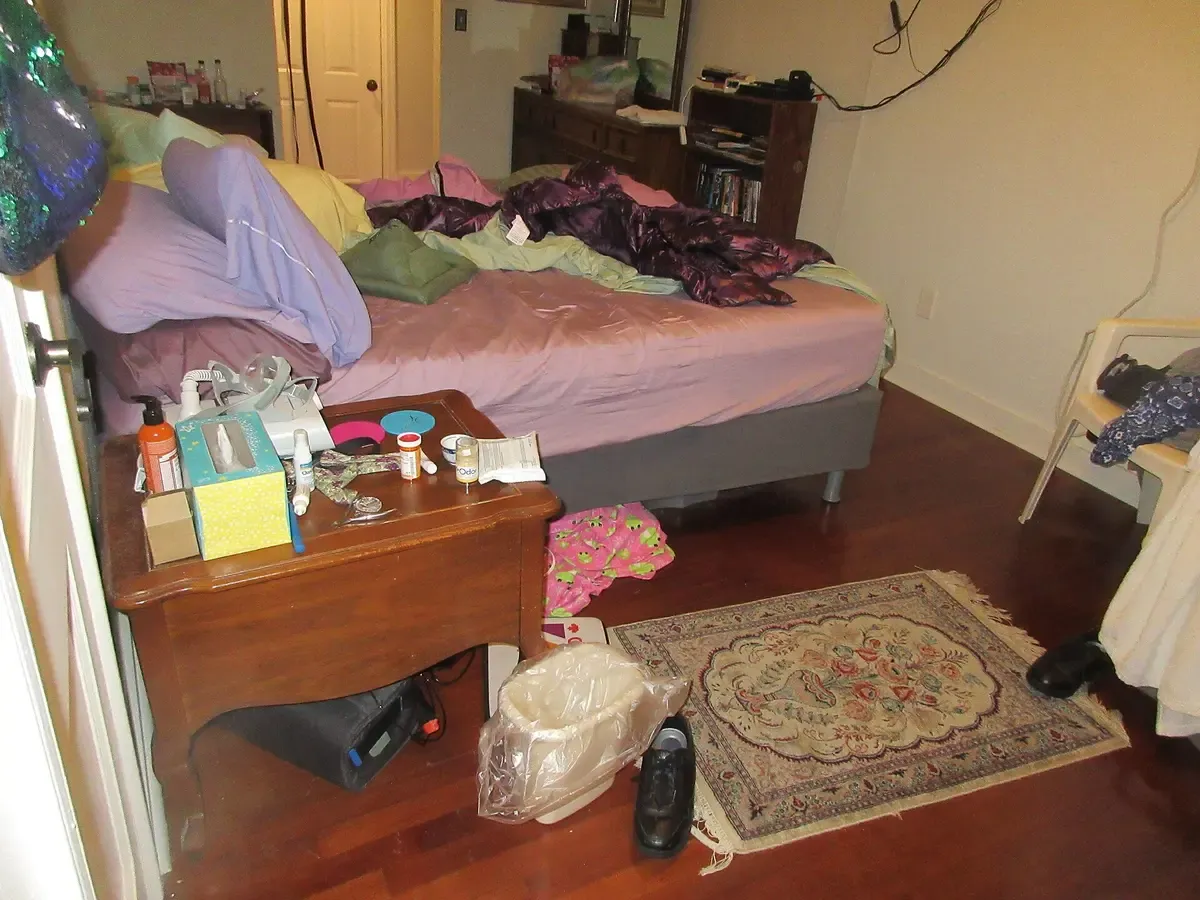
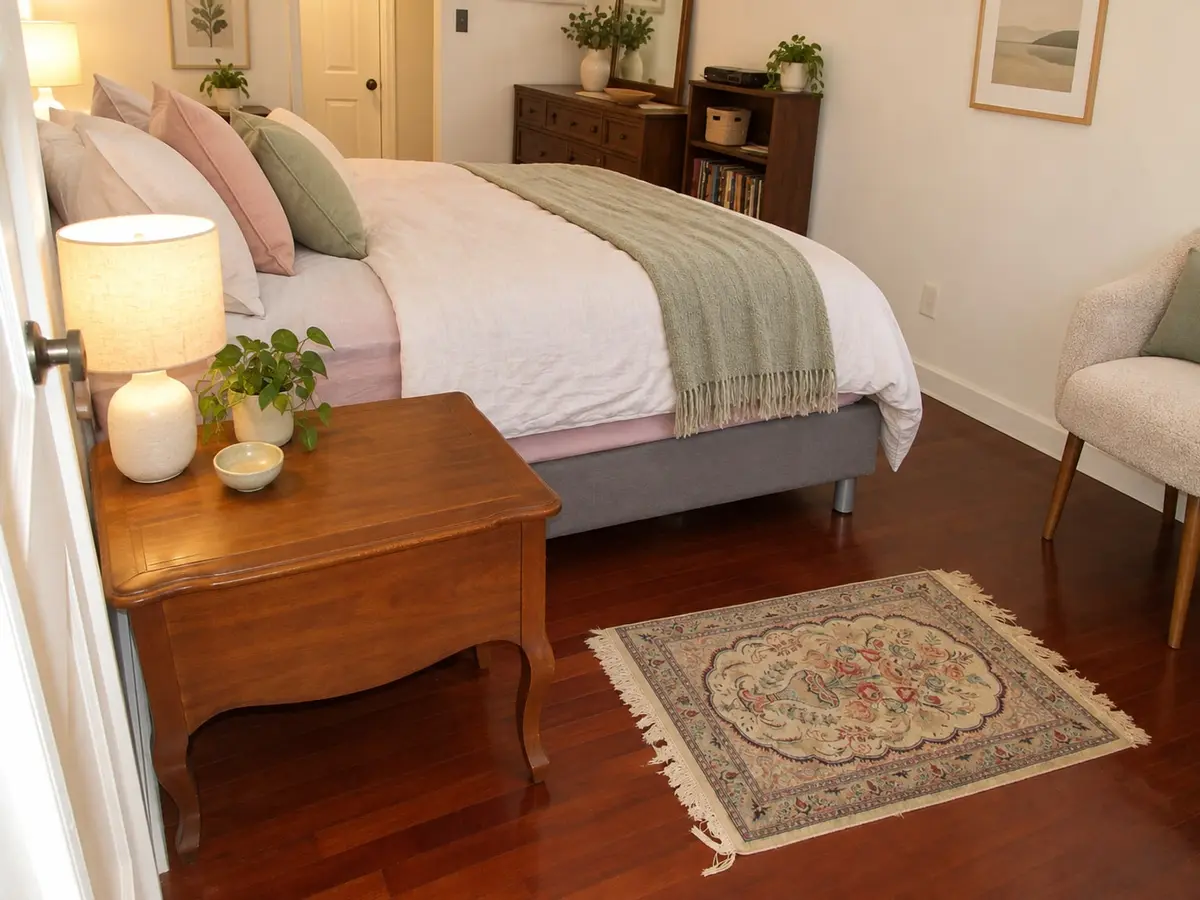
Asked: “Clean this room up and make it Scandinavian. Keep the bed and the wooden nightstand.” · Clean & redesign · Scandinavian
The bed, the wooden nightstand, the rug, the dresser and the door stay where they were; the clutter is gone and the bedding, lamps and plants are new.
Original photo by Infrogmation of New Orleans, CC BY 2.0, via Wikimedia Commons. The “after” is an unretouched Kubikly redesign (AI-generated); not a customer photo.
Things you can ask for
- “Keep the bed and the wooden nightstand; replace everything else”
- “Keep the sofa and the rug, replace the coffee table with a round one”
- “Remove the boxes and the exercise bike, keep the bookcase”
- “Replace the desk chair with a wooden one”
- “Keep the dining table, replace the chairs with upholstered ones”
How the marks work
- Keep: the item stays in the design as it is.
- Remove: the item is taken out of the picture.
- Replace: the item is swapped for a new piece in the chosen style and budget.
Anything you do not mark follows the mode. Redesign changes furniture where it serves the style, Full transformation replaces everything movable, and Declutter only removes clutter and leaves the rest.
Deciding what to keep
Keep the pieces that are expensive to replace and well made: a good sofa, solid-wood tables and storage, a large rug. Replace what is small, cheap or broken first; lamps, side tables, cushions and the desk chair change a room more for the money than anything else. If you are unsure about a piece, mark it Keep in one design and Replace in the next, and compare the two.
Step by step
- Upload a photo from a corner or the doorway, with the pieces you care about fully in frame.
- Wait for the analysis; it lists the furniture, decor and clutter it found.
- Go through the list and mark Keep, Remove or Replace.
- Choose a mode, a style and a budget level, and run the design.
- Read the spec panel: it lists what was kept, removed and added, so you can see that your marks were followed.
Limits
The marks apply to items the analysis found. Something mostly hidden behind another piece, or very small, may not be listed; describe it in words instead, such as “keep the plant on the windowsill”. A replaced item is a new design, not a product: there are no links, prices or brand names, and the image carries no measurements, so check sizes before you buy the real thing.
Frequently asked
- What if the analysis missed an item?
- Describe it in the request or in a revision, for example “keep the lamp on the left”. Items partly hidden behind others are the ones most often missed.
- Can I change my mind after seeing the result?
- Yes. Ask for a revision, such as “bring back the armchair” or “replace the rug too”. The previous design is the base, so what you do not mention stays.
- Will a kept item look the same as in my photo?
- It should, since it is listed as kept in the specification. Small details can still differ, so compare before and after with the slider.
- Does Replace tell me what to buy?
- No. It shows a new piece in the chosen style, but there are no product links, brands or prices.
Related
- Room redesignUpload a photo of your room and get a photoreal redesign of that same room: declutter, restyle, keep or replace furniture. Windows and doors stay put. First one free.
- Keep your layoutRedesign a Room Without Moving Walls: keep the layout, change the style
- Living roomAI Living Room Redesign from a Photo: a new look for the room you have
- DeclutterAI Declutter for Room Photos: see your room tidy, or tidied and restyled
- How AI room redesign from a photo worksWhat happens between uploading a room photo and getting a redesign: the room analysis, the design spec, the image edit, the geometry check, retries and refunds.